
App installieren
So wird die App in iOS installiert
Folge dem Video um zu sehen, wie unsere Website als Web-App auf dem Startbildschirm installiert werden kann.
Anmerkung: Diese Funktion ist in einigen Browsern möglicherweise nicht verfügbar.
Du verwendest einen veralteten Browser. Es ist möglich, dass diese oder andere Websites nicht korrekt angezeigt werden.
Du solltest ein Upgrade durchführen oder einen alternativen Browser verwenden.
Du solltest ein Upgrade durchführen oder einen alternativen Browser verwenden.
MOBIL Harry Potter: Wizards Unite
- Ersteller snooky
- Erstellt am
Benutzer, welche sich diesen Thread anschauen:
Gesamt: 1 (Mitglieder: 0, Gäste: 1)

 hab das letzte Event auch komplett. Ich würde mir irgendwie eine bessere Belohnung wünschen als Kamera Filter aber passt schon

Übersicht der Event Foundables, Informationen wo was zu finden sein wird:
Die Informationen für die 4 Event Seiten sind noch nicht final, die Aufgaben könnten sich noch ändern (wie letztes Mal auch kurz vor Eventstart geschehen ist)
Here we go, die 4 Event Seiten:

Das mit den Portkeys grandios verkackt würd ich sagen. Hab gestern schön 5x Harrys Koffer von Teil 1 des Events aus den Portkeys gezogen. 
War der Meinung dass ich zumindest 4Stk während Teil 2 gesammelt habe, offensichtlich aber nicht.
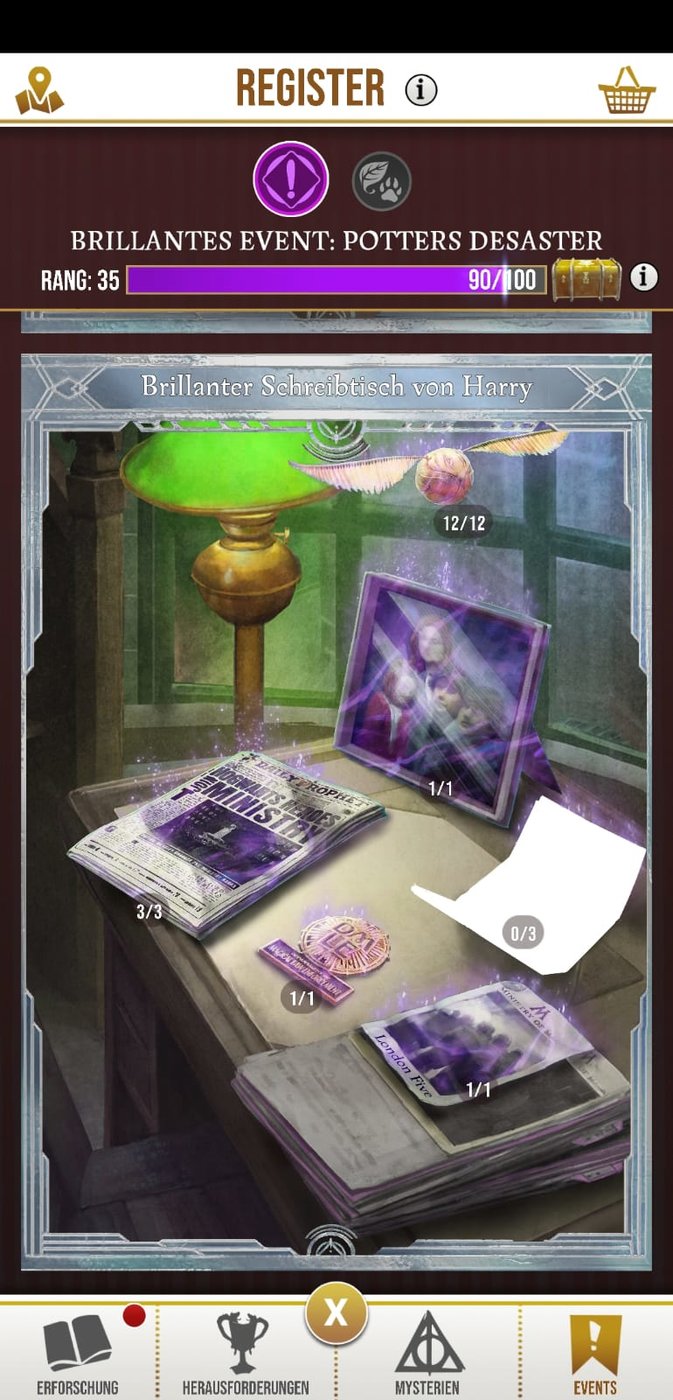
Dann halt hoffen dass aus den gestrigen Portkeys noch genug Teile für diese Seite rausspringen.
War der Meinung dass ich zumindest 4Stk während Teil 2 gesammelt habe, offensichtlich aber nicht.
Dann halt hoffen dass aus den gestrigen Portkeys noch genug Teile für diese Seite rausspringen.

Ab Mittwoch neues Event (Teil 1), in zwei Wochen dann der zweite Teil dazu:

https://harrypotterwizardsunite.com/post/backtohogwarts/
https://harrypotterwizardsunite.com/post/backtohogwarts/
Week 1 of the Back to Hogwarts Brilliant Event starts soon!
To help you on your tasks, here is where you can find the Brilliant Foundables on the Event Registry pages:
Week 1:
- Brilliant Slytherin Student - Brilliant Encounter
- Brilliant Ravenclaw Student - Brilliant Encounter
- Brilliant Gryffindor Student - Brilliant Encounter
- Brilliant Hufflepuff Student - Brilliant Encounter
- Trolley Witch - Wizarding Challenges with Brilliant Event Runestones
- Luggage Trolley - Brilliant Event Portkey
- Hogwarts Express Conductor - Quests
- Hogwarts Express - Quests
Brilliant Portkeys for this event will be 3km. As a reminder, Week 1 Portkeys will give you Week 1 rewards anytime you open them, even if you wait to open them during Week 2.
Also, Week 1 Brilliant Encounters will still be popping up on the Map during Week 2.
Hope this helps you all prepare!
4 Encounters in Woche 1 - ui
ich glaube es bezieht sich auf dein Berufslevel, mit dem Spielerlevel selbst wird man ja nicht besser. Bücher sind ein langsamer Progress im Spiel, das ist richtig.
Bei den Festungen mach ich eigentlich noch immer mehr oder weniger genau ein Stufe 1 Kampf mit einer Level 1 Rune. einfach um die daily quest abzuhaken. Sollte aber auch mal ein wenig eintauchen um die Herausforderungsseiten mal zu füllen und die WDG Quests mal abschliessen zu können
Das Event Teil 1 habe ich komplett abgeschlossen, warte diese Woche nun noch ab mit Portkeys aufnehmen um dann gleich frische von Teil 2 einzusammeln. Schlüssel sind ansonsten nämlich langsam Mangelware bei mir.
Bei den Festungen mach ich eigentlich noch immer mehr oder weniger genau ein Stufe 1 Kampf mit einer Level 1 Rune. einfach um die daily quest abzuhaken. Sollte aber auch mal ein wenig eintauchen um die Herausforderungsseiten mal zu füllen und die WDG Quests mal abschliessen zu können
Das Event Teil 1 habe ich komplett abgeschlossen, warte diese Woche nun noch ab mit Portkeys aufnehmen um dann gleich frische von Teil 2 einzusammeln. Schlüssel sind ansonsten nämlich langsam Mangelware bei mir.


Ach ich habe mal den super trank genommen, dann das es nicht weglaufen kann und dann ist es trotzdem verschwunden.
Herausforderungen bringen auch echt kaum XP. Auch mit trank, echt doof.
Gibt's auch ne Liste wo ich welche Sache finden kann? Manche finde ich 1000 mal und ein anderes aus dem Bild vllt nur einmal...
Herausforderungen bringen auch echt kaum XP. Auch mit trank, echt doof.
Gibt's auch ne Liste wo ich welche Sache finden kann? Manche finde ich 1000 mal und ein anderes aus dem Bild vllt nur einmal...
ja, gibt solche Liste, wie aktuell die jeweils sind weiss ich nicht. Manche Fundsachen bekommst du nur aus Portkeys oder den Zauberherausforderungen. Die Kampfdinger (Doxy, Zentaur, ... ) sind teilweise tageszeitabhängig (gibt Tag, Nacht, Sonnenauf- untergang und Vollmond)
https://jibsentertainment.com/2019/04/18/wizards-unite-all-potential-encounters-foundables-enemies/
https://jibsentertainment.com/2019/04/18/wizards-unite-all-potential-encounters-foundables-enemies/
Hi!
We have updated Harry Potter: Wizards Unite to app version 2.4.0. Check out all of the latest additions and bug fixes below:
New Features:
Brilliant Event: Fighting Forces:
- Get ready to earn more Restricted Section Books and unlock a new Portkey location with October’s Brilliant Event: Fighting Forces! Week 1: 10/8 - 10/14. Week 2: 10/22 - 10/28.
Encounters:
- When you successfully cast a spell and return a Foundable, you will now be able to skip through the return animation by tapping on the screen. This will only be possible once you have already returned 1 fragment of a Foundable.
Greenhouses:
- You can now tap to skip the pot shuffling animation when you visit a Greenhouse
Registry:
- Bogrod the Goblin is now available in Photo Mode
Portrait:
- You will no longer have to tap each Lens, Frames, or Stickers in your Ministry ID Portrait to dismiss the new item badge (red dot)
Portkeys:
- If you open multiple Portkeys at once, you will now only get one dialog box to let you know you have unlocked one or more Portkeys.
- The Portkey Rewards screen will show even if you’re unable to tap 5 wrackspurts or you leave the Portkey unexpectedly.
Ministry ID:
- Tap and hold Achievement badges in your Ministry ID to get a reminder of which Achievement you completed to receive the badge
Wizarding Challenges:
- Added Spell Energy to rewards if you win a Wizarding Challenge at a Sponsored Fortresses
Bug Fixes:
Wizarding Challenges:
- Fixed an issue with Recommended Grade for Chambers being displayed in red text if the player’s Grade is equal to the recommended Grade
Potions:
- Fixed an issue where players may become stuck in the Potions Tutorial if they tap the ladle before the Tutorial sequence reaches the Master Notes section
SOS Assignments
- [Beta Players] Players who were in beta before SOS Assignments were introduced are unable to complete the Mysteries tasks
- Fixed an issue where progress for the SOS Assignment: ‘Complete 3 Wizarding Challenges with 3 Teammates’ wasn’t consistently recorded.
General:
- Fixed an issue where players would receive a message that there isn't enough space on their device to "Download All Assets", even if there's adequate space available on their device
- Fixed an issue with the “Download All Assets” occasionally failing
Known Issues:
Achievements:
- The “Friends Listed 1: Have 1 Friend in Your Friends List” Achievement may not appear completed until an hour has passed
Wizarding Challenges
- Foes may appear to receive Stamina or have negative Stamina after being attacked or defeated
Ministry ID
- Players may receive a black screen when switching from the app in Gallery Mode, to take a photo from the device’s camera roll, then going back to the app
- Player’s Portrait may become inverted when taking a photo in the Ministry ID
Registry
- Foundables that are not from Encounters can sometimes have a high Seen number, even if they are not Seen in Encounters
- Foundables in Photo Mode may flip around when a player taps on the Foundable to reposition
Potions:
- Potion Brewing Queue slots may disappear after collecting a Potion and immediately attempting to brew another Potion. Exiting the Potions section fixes this issue.
General:
- Player may receive an error if they attempt to add an emoji to their Codename or to their First/Last Name (Ministry ID Name)
neues Event kommt, fett gedrucktes ist endlich möglich (yay)
Ähnliche Themen
G
-
Gelöschte Mitglieder 617
- Antworten
- 187
- Aufrufe
- 18K
G

- Antworten
- 6
- Aufrufe
- 2K

- Gesperrt
- Antworten
- 27
- Aufrufe
- 2K

- Antworten
- 19
- Aufrufe
- 2K

- Antworten
- 66
- Aufrufe
- 7K
