Foren Aktuelles Erstellen Mitglieder Anmelden

APPLE Der ultimative Apple Thread

Benutzer, welche sich diesen Thread anschauen:

Ich habe gelesen, dass die neuen Air Modelle einen wesentlich langsameren Flash Speicher verbaut haben.

EDIT:

2014 MacBook Airs Demonstrating Slower Flash Storage Speeds Than 2013 Models

Friday May 2, 2014 11:55 am PDT by Juli Clover
The newly released 2014 MacBook Airs are seeing improved processor performance thanks to updated Haswell chips, but storage performance appears to have declined.

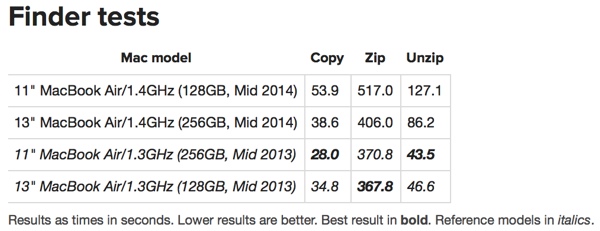
In a series of performance benchmark tests performed by Macworld, tests of the flash storage suggested the new MacBook Airs are performing slower than the 2013 MacBook Airs. The comparison, which included a 2013 11-inch MacBook Air with a 256GB SSD and a 2013 13-inch MacBook Air with a 128GB SSD vs. a 2014 11-inch model with a 128GB SSD and a 13-inch model with a 256GB SSD, found that the 2014 models were twice as slow as the 2013 models at some tasks.Copying 6GB of files and folders took 28 seconds on last year's 11-inch MacBook Air, but took nearly twice as long (54 seconds) on this year's 11-inch model. With solid-state storage, lower capacity drives are often slower performers, and last year's 11-inch had the higher capacity 256GB of flash. However, the new 11-inch model was also slower than last year's 13-inch model with 128GB of flash storage.Compressing 6GB of files also took longer on the 2014 MacBook Air, and Macworld described unzipping as "just plain slow" with the new 11-inch version taking three times as long to unzip files as the 2013 model.

findertests.jpg


Using fewer but larger files, the performance difference narrowed between the two models, but the 2014 11-inch MacBook Air still performed 35 percent slower copying files than the mid–2013 13-inch MacBook Air with the same storage capacity and 53 percent slower when uncompressing files.

The Blackmagic Disk Speed Test also showed the new models running slower than the older models, with write/read speeds as follows (in MBps):

- 2013 13-inch with 128GB SSD: 445/725
- 2013 11-inch with 256GB SSD: 687/725
- 2014 13-inch with 256GB SSD: 520/676
- 2014 11-inch with 128GB SSD: 306/620

All four of the drives in the MacBook Airs tested came from different manufacturers, with two from Samsung, one from Toshiba, and one from SanDisk, which accounts for the performance discrepancies. Speed differences between SSDs used within Apple's MacBook Air computers have been highlighted before in previous models and as suggested in the past, while the speed variations may be noticeable in some high-intensity tasks, they are unlikely to be noticed during day-to-day usage.

Released earlier this week, the new MacBook Airs are available from Apple's websitebeginning at $899.

Related roundup: MacBook Air
 
Zuletzt bearbeitet:
Caffeine funzt super, vor allem in Kombination mit dem Ruhezustand für den Monitor.

Kann man irgendwo die Ordner/Symboleinstellunge generell festlegen? Aktuell muss ich in jedem Ordner nur für diesen einen Größe/Abstand/Sortierreihenfolge der Icons festlegen.

Wie trenne ich USB-Stick/ExterneHDD richtig vom Mac?
 
Direkt im entsprechenden Fenster ganz unten.

Bildschirmfoto 2014-05-04 um 15.07.29.png


Externe Medien zieht man auf den Papierkorb (Icon verändert sich entsprechend) oder drückt CMD+E, wenn das entsprechende Icon ausgewählt wurde.
 
Kann dir übrigens nur die OS X eigene Hilfe empfehlen. Die findest du direkt im Findermenü ganz rechts und die liefert dir auch über fast alle Begriffe ein entsprechendes Hilfethema und Ergebnis und zeigt dir zusätzlich auch gleich den entsprechenden Weg und/oder den exakten Menüpunkt.

Am Beispiel Auswerfen.

Bildschirmfoto-2014-05-04-um-15.12.24.jpg

Bildschirmfoto-2014-05-04-um-15.12.24_2.jpg
 
Hmm ne. Wenn ich z.B. unter Dokumente alles einstell und auf Standard verwenden klicke ist es in allen anderen Ordnern (Fotos, Downloads, Programme..) immer noch so wie vorher.

Edit: Stimmt, die Hilfe ist schön gemacht
 
Doch, doch. Funktioniert einwandfrei. :)
Hier noch das offizielle Dokument diesbezüglich: http://support.apple.com/kb/PH13896?viewlocale=de_DE&locale=de_DE

Edit: Als Anmerkung. Du veränderst damit natürlich nur die Standard-Darstellung, wie der Button das auch vermuten lässt. Das bedeutet, dass überall da, wo du bereits manuell eine individuelle Darstellungsansicht vorgenommen hast, diese auch weiterhin bestehen bleibt und von der Veränderung an der Standard-Darstellung unberührt bleibt. Ergo musst in den jeweiligen Ordnern dann natürlich erstmals die Standard-Darstellung wiederherstellen. Das geht, in dem du die ALT-Taste in den Darstellungsoptionen gedrückt hältst, dann steht da anstatt "Als Standard verwenden" eben "Standard wiederherstellen".
 
Zuletzt bearbeitet von einem Moderator:
Ah okay. Mein Prob war, das ich die Symbole in ein paar Ordner als Liste hatte, in anderen als Symbole. Das musste ich erstmal für jedes Verzeichniss per Hand (in meinem Fall) auf Liste ändern. Erst dann konnte ich den Standard bequem, wie von dir geschildert, anwenden.

Gibt es neben Caffeine, CCleaner, Gimp, XCode, VLC und Alfred weitere Programme die quasi Standard für jeden Mac-User sind?
 
Zuletzt bearbeitet:
Ich habe gelesen, dass die neuen Air Modelle einen wesentlich langsameren Flash Speicher verbaut haben.

EDIT:

2014 MacBook Airs Demonstrating Slower Flash Storage Speeds Than 2013 Models

Friday May 2, 2014 11:55 am PDT by Juli Clover
The newly released 2014 MacBook Airs are seeing improved processor performance thanks to updated Haswell chips, but storage performance appears to have declined.

In a series of performance benchmark tests performed by Macworld, tests of the flash storage suggested the new MacBook Airs are performing slower than the 2013 MacBook Airs. The comparison, which included a 2013 11-inch MacBook Air with a 256GB SSD and a 2013 13-inch MacBook Air with a 128GB SSD vs. a 2014 11-inch model with a 128GB SSD and a 13-inch model with a 256GB SSD, found that the 2014 models were twice as slow as the 2013 models at some tasks.Copying 6GB of files and folders took 28 seconds on last year's 11-inch MacBook Air, but took nearly twice as long (54 seconds) on this year's 11-inch model. With solid-state storage, lower capacity drives are often slower performers, and last year's 11-inch had the higher capacity 256GB of flash. However, the new 11-inch model was also slower than last year's 13-inch model with 128GB of flash storage.Compressing 6GB of files also took longer on the 2014 MacBook Air, and Macworld described unzipping as "just plain slow" with the new 11-inch version taking three times as long to unzip files as the 2013 model.

findertests.jpg


Using fewer but larger files, the performance difference narrowed between the two models, but the 2014 11-inch MacBook Air still performed 35 percent slower copying files than the mid–2013 13-inch MacBook Air with the same storage capacity and 53 percent slower when uncompressing files.

The Blackmagic Disk Speed Test also showed the new models running slower than the older models, with write/read speeds as follows (in MBps):

- 2013 13-inch with 128GB SSD: 445/725
- 2013 11-inch with 256GB SSD: 687/725
- 2014 13-inch with 256GB SSD: 520/676
- 2014 11-inch with 128GB SSD: 306/620

All four of the drives in the MacBook Airs tested came from different manufacturers, with two from Samsung, one from Toshiba, and one from SanDisk, which accounts for the performance discrepancies. Speed differences between SSDs used within Apple's MacBook Air computers have been highlighted before in previous models and as suggested in the past, while the speed variations may be noticeable in some high-intensity tasks, they are unlikely to be noticed during day-to-day usage.

Released earlier this week, the new MacBook Airs are available from Apple's websitebeginning at $899.

Related roundup: MacBook Air


Was ist denn das für ein Kack jetzt?
Ich wollte mir eigentlich zur Feier des Tages endlich ein Macbook air gönnen.
 
Angeblich kommt bis Ende des Jahres sogar eine neue Office for Mac Version (2014), welche sich sehen lassen kann!

Imho ist iWork nett, aber kein Vergleich zu Office.
 
Zurück
Oben