
App installieren
So wird die App in iOS installiert
Folge dem Video um zu sehen, wie unsere Website als Web-App auf dem Startbildschirm installiert werden kann.
Anmerkung: Diese Funktion ist in einigen Browsern möglicherweise nicht verfügbar.
Du verwendest einen veralteten Browser. Es ist möglich, dass diese oder andere Websites nicht korrekt angezeigt werden.
Du solltest ein Upgrade durchführen oder einen alternativen Browser verwenden.
Du solltest ein Upgrade durchführen oder einen alternativen Browser verwenden.
ONE Der offizielle Xbox One Preview Update Thread
- Ersteller Hana-Bi
- Erstellt am
Benutzer, welche sich diesen Thread anschauen:
Gesamt: 1 (Mitglieder: 0, Gäste: 1)


satzberger
einmal xbox, immer xbox :)
lange dauert es wohl nicht mehr (im reddit gefunden):
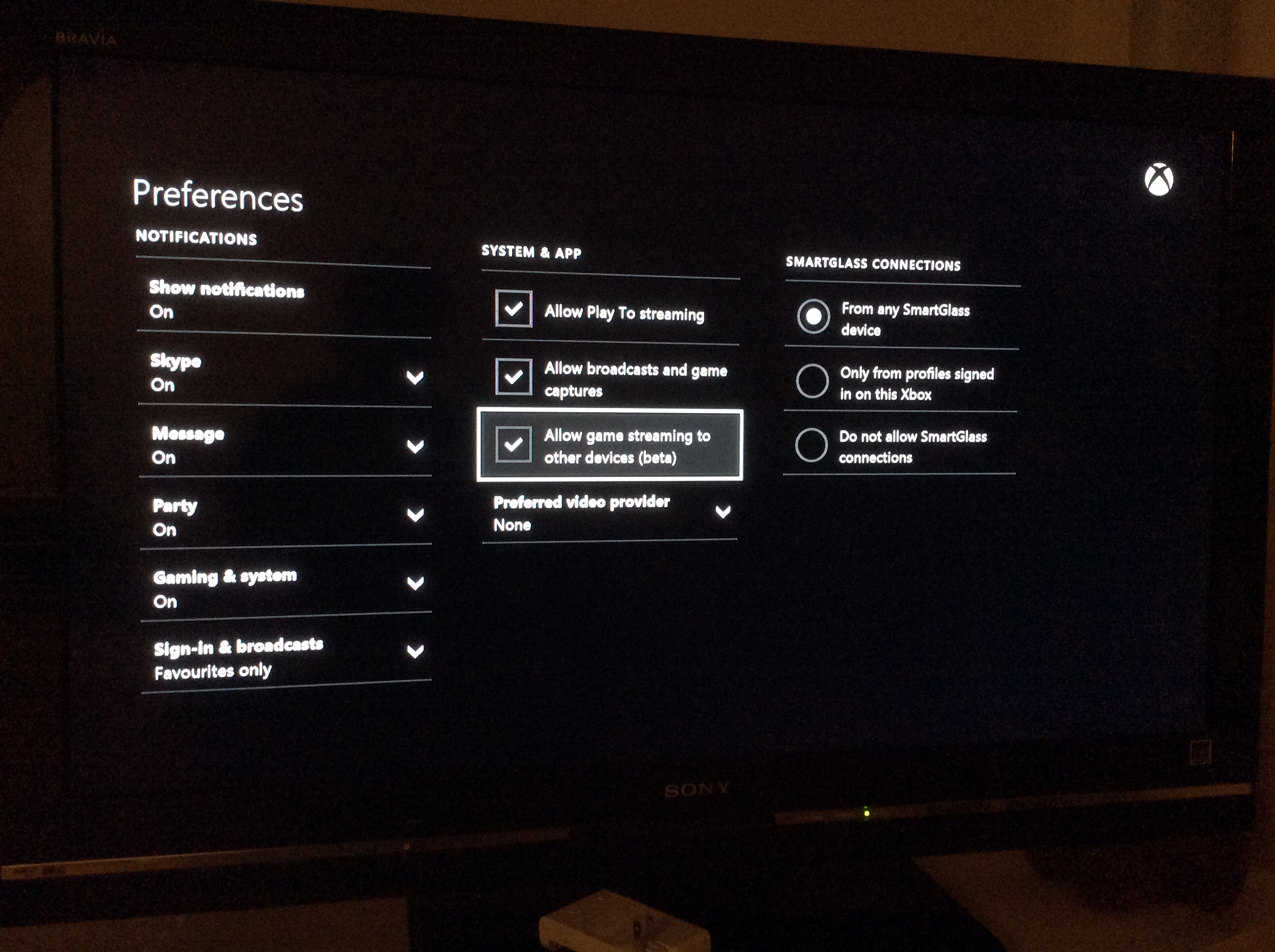
In der XBOX ONE App für Windows 10 gibt es auch schon so einen Punkt...
Was natürlich super wäre wenn man irgendwann mal auch die ganzen Spiele auf die Xbox 360 streamen könnte...(hab jetzt meine im Arbeitszimmer, daneben steht der Pc - somit könnte man die ONE Games auf den Pc streamen, aber auf die 360 wäre es fast noch besser weil die am Zweit Tv hängt)
In der XBOX ONE App für Windows 10 gibt es auch schon so einen Punkt...
Was natürlich super wäre wenn man irgendwann mal auch die ganzen Spiele auf die Xbox 360 streamen könnte...(hab jetzt meine im Arbeitszimmer, daneben steht der Pc - somit könnte man die ONE Games auf den Pc streamen, aber auf die 360 wäre es fast noch besser weil die am Zweit Tv hängt)





Ist ja nett, was technisch möglich ist, aber sind das nicht eher recht isolierte Fälle? Ich weiß das kommt offiziell für Win10/One, aber mir fällt da irgendwie kein ernsthafter Einsatzzweck für ein, der nicht irgendwie konstruiert wirkt.Was natürlich super wäre wenn man irgendwann mal auch die ganzen Spiele auf die Xbox 360 streamen könnte...(hab jetzt meine im Arbeitszimmer, daneben steht der Pc - somit könnte man die ONE Games auf den Pc streamen, aber auf die 360 wäre es fast noch besser weil die am Zweit Tv hängt)
So ganz abgeschrieben wurde die 360 von MS ganz sicher nicht. Immerhin wurde gerade erst ein Update-Preview-Programm für Systemupdates gestartet.Glaub kaum das es auf der 360 gehen wird...da bekanntlich nur die One Win10 elemente/teile bekommt
satzberger
einmal xbox, immer xbox :)
Ist ja nett, was technisch möglich ist, aber sind das nicht eher recht isolierte Fälle? Ich weiß das kommt offiziell für Win10/One, aber mir fällt da irgendwie kein ernsthafter Einsatzzweck für ein, der nicht irgendwie konstruiert wirkt.
Natürlich wird es nicht all zu viele Anwendungsfälle geben und die Mehrheit der Spieler wird das wohl gar nicht nutzen aber wie ich eh schon mal geschrieben habe - und so wird es wohl anderen auch gehen:
Wenn zb mal wieder die Freundin ihren Serienabend hat (zb bei uns am Mo und es spielt von grey's anatomy über Mistresses alles durch) dann wäre es doch ganz nett mal eine Runde Fifa zu zocken. Natürlich würde ich die neuen Games auf dem großen Tv zocken aber so Spiele wie Fifa 15 oder FH 2 - die man eh schon 100 Stunden gespielt hat und auswendig kennt - da würde mir eben der Pc Bildschirm reichen bzw. der kleinere Tv im Arbeitszimmer. Wie oft man das dann wirklich benutzt ist wieder eine andere Frage.
Was aber eben positiv ist: man muss sich nix anderes besorgen weil man mehr oder weniger alles schon zur Verfügung hat.
a) eine ONE
b) Windows 10 - gibt's sowieso gratis - auf meinen Pc läuft seit Jänner nix anderes
c) Das Gamepad lässt sich ganz leicht mit USB Kabel an den Pc anschließen
Jedenfalls bin ich schon sehr gespannt


LAEMMLI
XBOX NIVO
Zu dem hätt ich gleich noch ne Frage. Ich werde meinen One Controller auch am PC anschliessen...c) Das Gamepad lässt sich ganz leicht mit USB Kabel an den Pc anschließen
Muss ich da was beachten oder speziell installieren?


Attendorner
Kombiniere: Game On!
New Features in Preview for Xbox App on Windows 10 and Xbox One
Xbox keeps getting better with more new features coming to preview this month for both Xbox One consoles and the Xbox app on Windows 10. We’re making the Xbox app more social, while also giving you more control over your Xbox experience. Also, this month we are delivering several new fan-requested features to the Xbox One console and Xbox One SmartGlass.
Game DVR for PC games – The Game bar lets you record game clips of your favorite Windows games.
Screenshots – Take screenshots of Windows PC games by pressing Windows + Alt + PrtScr. Just as with Game DVR, you can also do this by clicking the “Screenshot” button on the Game bar.
Live Tiles – The Xbox tile on your Windows 10 start menu now welcomes you back, showing off your gamerpic and letting you know when you have new messages and activity alerts.
Avatar app – A new app is available in the Windows Store to customize your Xbox avatar’s appearance and outfit your avatar with a vast collection of items.
User profile – You can see another gamer’s bio, location, reputation, tenure, and other information in the more info page, including their animated avatar.
Real name sharing – Similar to the features we brought you in the March update on Xbox One, you can now choose to share your real name on the Xbox app with all of your friends or with everybody.
In addition to keeping you connected to your games and friends, we’re giving you even more control over the Xbox experience on Windows 10.
Xbox One Now Playing and media controls – The games and apps you’ve used most recently on your Xbox One are now displayed when you connect the Xbox app to your console. You can also use the Xbox app to pause, fast forward and rewind.
Live TV streaming and PIP (picture in picture) support – For preview members with an Xbox One Digital TV Tuner (in 16 European countries and Australia) or a Hauppauge 955Q TV Tuner (available in the U.S. or Canada) attached to their Xbox One, you can now stream live TV within your home from your Xbox One to Windows 10 PC running the Xbox app.
Xbox controller drivers – The drivers for Xbox controllers are now included with Windows 10, so you no longer have to download and install controller drivers on Windows 10.
The Xbox app will automatically update to the April preview version when it becomes available in the Windows Store. Once you receive the update, your version number should be 4.4.9014.0 or higher. You can verify the version number of the Xbox app in Settings.
Over-the-air TV for the U.S. and Canada – Earlier this month, we announced the preview for an Over-the-Air Tuner for the U.S. and Canada.
Power on and off from Xbox One SmartGlass – The beta versions of the Xbox One SmartGlass apps for Windows, Windows Phone and Android will be updated to let you turn your Xbox One on and off.
Wireless Display app – Try the Wireless Display app to cast photos stored on your phone to your Xbox One, or to stream non-protected video content from your PC to your Xbox.
User-selectable power mode – Select your preferred power mode, either Instant-on or Energy-saving mode.
Voice messages – The ability to send and receive voice messages from the Xbox One messages app continues in preview this month.
For more details about each of these features, check out the full story at Xbox Wire. And stay tuned for more great Xbox features coming your way on Xbox One and the Xbox app on Windows 10.
http://majornelson.com/2015/04/22/new-features-in-preview-for-xbox-app-on-windows-10-and-xbox-one/
Xbox keeps getting better with more new features coming to preview this month for both Xbox One consoles and the Xbox app on Windows 10. We’re making the Xbox app more social, while also giving you more control over your Xbox experience. Also, this month we are delivering several new fan-requested features to the Xbox One console and Xbox One SmartGlass.
- Xbox on Windows 10
Game DVR for PC games – The Game bar lets you record game clips of your favorite Windows games.
Screenshots – Take screenshots of Windows PC games by pressing Windows + Alt + PrtScr. Just as with Game DVR, you can also do this by clicking the “Screenshot” button on the Game bar.
Live Tiles – The Xbox tile on your Windows 10 start menu now welcomes you back, showing off your gamerpic and letting you know when you have new messages and activity alerts.
Avatar app – A new app is available in the Windows Store to customize your Xbox avatar’s appearance and outfit your avatar with a vast collection of items.
User profile – You can see another gamer’s bio, location, reputation, tenure, and other information in the more info page, including their animated avatar.
Real name sharing – Similar to the features we brought you in the March update on Xbox One, you can now choose to share your real name on the Xbox app with all of your friends or with everybody.
In addition to keeping you connected to your games and friends, we’re giving you even more control over the Xbox experience on Windows 10.
Xbox One Now Playing and media controls – The games and apps you’ve used most recently on your Xbox One are now displayed when you connect the Xbox app to your console. You can also use the Xbox app to pause, fast forward and rewind.
Live TV streaming and PIP (picture in picture) support – For preview members with an Xbox One Digital TV Tuner (in 16 European countries and Australia) or a Hauppauge 955Q TV Tuner (available in the U.S. or Canada) attached to their Xbox One, you can now stream live TV within your home from your Xbox One to Windows 10 PC running the Xbox app.
Xbox controller drivers – The drivers for Xbox controllers are now included with Windows 10, so you no longer have to download and install controller drivers on Windows 10.
The Xbox app will automatically update to the April preview version when it becomes available in the Windows Store. Once you receive the update, your version number should be 4.4.9014.0 or higher. You can verify the version number of the Xbox app in Settings.
- Xbox One and SmartGlass updates
Over-the-air TV for the U.S. and Canada – Earlier this month, we announced the preview for an Over-the-Air Tuner for the U.S. and Canada.
Power on and off from Xbox One SmartGlass – The beta versions of the Xbox One SmartGlass apps for Windows, Windows Phone and Android will be updated to let you turn your Xbox One on and off.
Wireless Display app – Try the Wireless Display app to cast photos stored on your phone to your Xbox One, or to stream non-protected video content from your PC to your Xbox.
User-selectable power mode – Select your preferred power mode, either Instant-on or Energy-saving mode.
Voice messages – The ability to send and receive voice messages from the Xbox One messages app continues in preview this month.
For more details about each of these features, check out the full story at Xbox Wire. And stay tuned for more great Xbox features coming your way on Xbox One and the Xbox app on Windows 10.
http://majornelson.com/2015/04/22/new-features-in-preview-for-xbox-app-on-windows-10-and-xbox-one/
satzberger
einmal xbox, immer xbox :)
Das miracast doch noch kommt freut mich gewaltig

User-selectable power mode – Select your preferred power mode, either Instant-on or Energy-saving mode.
Was bedeutet das genau? Kann man nun endlich durch Drücken des Guidebuttons auswählen ob man in den Standby oder komplett ausschalten will? Kann das mal einer der das Preview hat checken?

RRocketRac3r
"Life Is About Passions" - Michael Schumacher
Was bedeutet das genau? Kann man nun endlich durch Drücken des Guidebuttons auswählen ob man in den Standby oder komplett ausschalten will? Kann das mal einer der das Preview hat checken?
Das Update ist glaube ich noch nicht verfügbar. Bei mir war zumindest eben nichts da.
Aber ich schätze mal, Du denkst bei dem Feature an dasselbe wie ich - da haben wir uns ja hier schon mal drüber unterhalten.


satzberger
einmal xbox, immer xbox :)
bei mir geht leider überhaupt nix.
Mein Laptop unterstützt anscheinend nicht die Funktion Miracast. (ist von 2011)
Mein Galaxy S4 wird nicht erkannt und mein Galaxy Tap Pro 10.1 findet auch nicht die XBOX. Finde ich extrem schade weil auf die App habe ich mich sehr gefreut
Mein Laptop unterstützt anscheinend nicht die Funktion Miracast. (ist von 2011)
Mein Galaxy S4 wird nicht erkannt und mein Galaxy Tap Pro 10.1 findet auch nicht die XBOX. Finde ich extrem schade weil auf die App habe ich mich sehr gefreut
Attendorner
Kombiniere: Game On!
Ähnliche Themen

- Antworten
- 444
- Aufrufe
- 24K


