Foren Aktuelles Erstellen Mitglieder Anmelden

SONY Playstation Portal

Benutzer, welche sich diesen Thread anschauen:

Gerücht

Um diese Inhalte anzuzeigen, benötigen wir die Zustimmung zum Setzen von Drittanbieter-Cookies.
Für weitere Informationen siehe die Seite Verwendung von Cookies.

With the new update, the PlayStation Portal OLED Model would be more attractive to new customers; however, we have yet to receive official confirmation, so readers should take this information with a grain of salt for now.

PS Portal Pro
 
Ich spiele aktuell echt mit dem Gedanken, mir die PlayStation Portal zu holen. Ich hätte jetzt fast gesagt, dass ich bis zum Release des möglichen OLED-Models warte aber bisher ist ja noch nichts konkret angekündigt worden. Wie sind denn eure Erfahrungen bisher? Ich erwische mich in letzter Zeit häufiger mit der Switch auf dem Sofa. Von daher würde es grundsätzlich zu meinem aktuellen Spielverhalten passen.

 
Wie ist das eigentlich mittlerweile mit der PS Portal, kann man auch ohne PS5 Streamen? Also direkt ab Sonys Servern? Bin am überlegen mir eine zuzulegen. Möchte im Sommer Ghost of Yotei damit spielen, hab aber meine PS5 abgebaut. Geht das mittlerweile?
 
ohne PS5 würde ich mir kein PS Portal kaufen und neben den Abo Kosten für Premium brauchst ja auch noch Ghost of Yotei selbst. Sehr teurer Spaß. MM Deutschland hat noch dieses WE die 15% Aktion u.a. PS5 Slim Digital Fortnite Cobalt Star Bundle 322.15€..
 
Um diese Inhalte anzuzeigen, benötigen wir die Zustimmung zum Setzen von Drittanbieter-Cookies.
Für weitere Informationen siehe die Seite Verwendung von Cookies.

Here are some details of the new features.

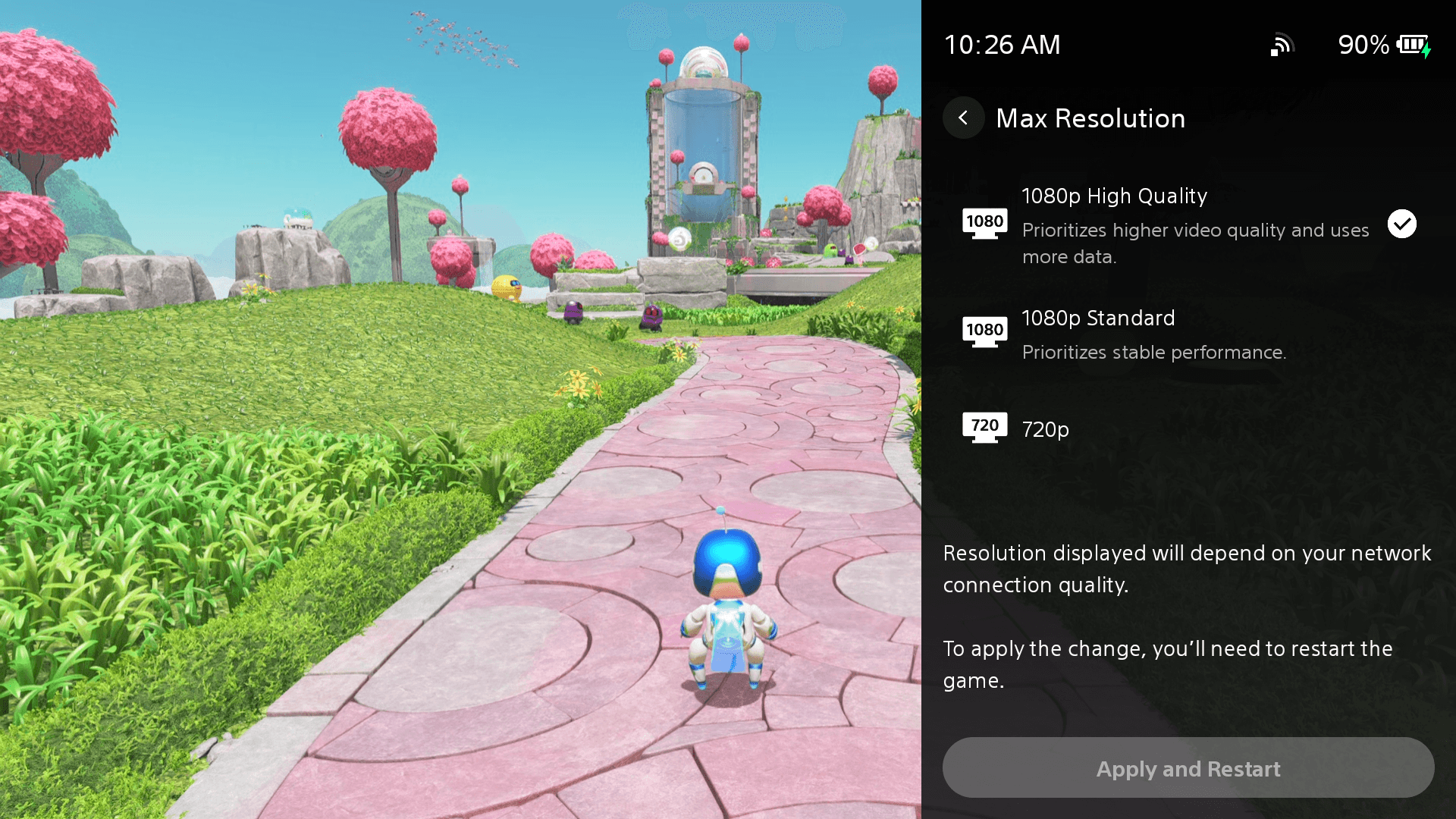
1080p High Quality mode​

Players can now select a 1080p High Quality mode during Remote Play and Cloud Streaming. This new mode enables players to enjoy games at a higher bitrate compared to the default 1080p Standard mode, providing a smooth and high-fidelity experience.**

  • To enable the mode, go to [Quick Menu] > [Max Resolution] and select [1080p High Quality] during Remote Play or Cloud Streaming.
  • You can apply the change by restarting the Remote Play / Cloud Streaming session.
1080p High Quality mode setting screen
View and download image "1080p High Quality mode setting screen"

Refined Cloud Streaming experience​

We’ve introduced several enhancements to improve usability and reduce friction during Cloud Streaming*** sessions.

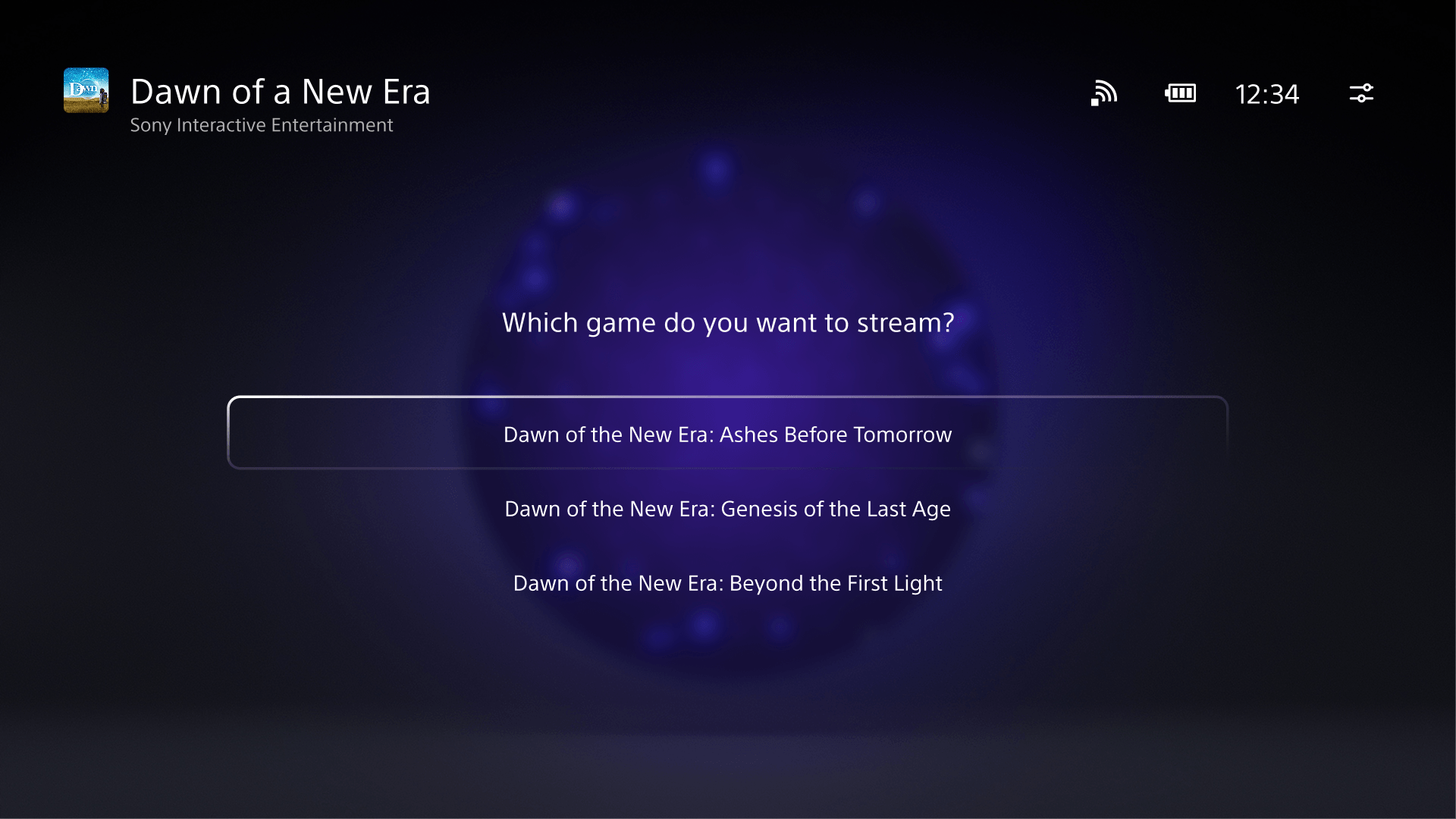
  • Improved Product Detail Page:When you select “Stream” on the product detail pages of game bundles, a new UI will show up, allowing you to select a specific game to play from that bundle.
  • Game Invite: If you’re actively streaming a supported title and receive game invites, you’ll now see a clear on-screen notification on PS Portal, ensuring you never miss an invitation while playing.
  • Enhanced Trophy notifications:Trophy notifications now clearly display the trophy name and associated image when unlocked. Platinum trophies will also feature their special animation, bringing greater visibility and celebration to your achievements.
  • Improved Search screen: The search interface has been refined for a smoother experience, such as the On Screen Keyboard display being available immediately when going into search.
Select the specific game you want to play from the bundle
View and download image "Select the specific game you want to play from the bundle"
*Sample game for illustrative purposes only

Smoother onboarding experience​

If you don’t have an account for PlayStation yet, getting started is now easier than ever. With an improved UI and onboarding flow, you can now quickly create an account and sign in to your PS Portal by scanning the QR code using your mobile device.
 
Zurück
Oben