
App installieren
So wird die App in iOS installiert
Folge dem Video um zu sehen, wie unsere Website als Web-App auf dem Startbildschirm installiert werden kann.
Anmerkung: Diese Funktion ist in einigen Browsern möglicherweise nicht verfügbar.
Du verwendest einen veralteten Browser. Es ist möglich, dass diese oder andere Websites nicht korrekt angezeigt werden.
Du solltest ein Upgrade durchführen oder einen alternativen Browser verwenden.
Du solltest ein Upgrade durchführen oder einen alternativen Browser verwenden.
PC Windows 10 - Das beste Windows ever, ever, EVER!
- Ersteller Fergy
- Erstellt am
Benutzer, welche sich diesen Thread anschauen:
Gesamt: 1 (Mitglieder: 0, Gäste: 1)
Hmm... ich hab Win 8.1 und hatte die ganze Zeit keine Probleme mit diesem Auto Update auf Win 10 (was ich NICHT will). Aber jetzt hab ich vor ~zwei Tagen Updates runtergeladen und zack kommt diese dapperte Meldung a la Windows 10 steht zur Installation bereit. Daraufhin hab ich nen Systemwiederherstellungspunkt geladen, weil ich dachte, dass ich aus Versehen auch das Win 10 Upgrade mit installiert habe. So, heute guck ich mir extra jedes einzelne Update das installiert werden soll, an und da steht definitiv kein Wort von Windows 10. Ich installier und zack Ihr Upgrade auf Windows 10 steht bereit...
Kann mir jemand sagen, wie ich das wegbekommeIch würde ja gerne mein Win 10 aktuell halten, nur eben ohne auf Win 10 hochzugehen...
Wenn da jetzt stehen würde du würdest windows 7 behalten wollen, aber um gottes willen was ist denn an 8(.1) besser als an win 10? gut das john doe btw. die antwort wusste, hätt ich nicht gewusst.

Steffko
Erbsenzähler
Du musst den optionalen Knowledge Base-Patch KB3184143 installieren, dann ist es weg.
Update ist bereits auf dem Computer installiert, sagt er mir
(Hab mal die Updates durchsucht, ist es auch, ~Ende 2016)Wenn da jetzt stehen würde du würdest windows 7 behalten wollen, aber um gottes willen was ist denn an 8(.1) besser als an win 10? gut das john doe btw. die antwort wusste, hätt ich nicht gewusst.
Win 8.1 läuft bei mir einfach seit Jahren problemlos. Und bei Win 10 hatte ich Probleme mit der Soundkarte. Die fliegt zwar früher oder später raus, aber eben erst wenn ich mal groß aufrüste.

John Doe
Drar CH's Bane
Update ist bereits auf dem Computer installiert, sagt er mir
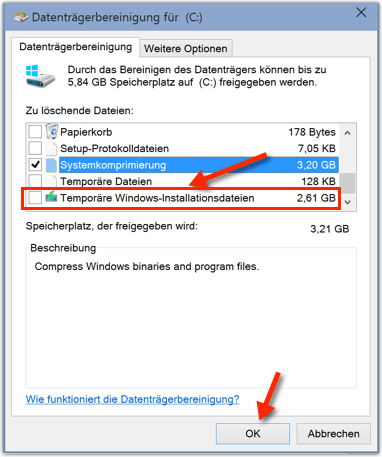
Seltsam. Aber die Meldung besagt ja offenbar, dass es schon runtergeladen wurde, in dem Fall musst du es wohl nur über die Datenträgerbereinigung entfernen. Der entsprechende Punkt müsste "Temporäre Installationsdateien" oder so ähnlich heißen, wenn ich das noch richtig im Kopf habe.
[EDIT] Es heißt "Temporäre Windows-Installationsdateien":
Steffko
Erbsenzähler
Alles total kurios... wollte nen Wiederherstellungspunkt laden, um aus der ganzen Mühle rauszukommen (hat vorher schon funktioniert). Das ganze hat mir Windows nach Neustart mit nem Fehler quittiert, aber trotzdem ist das ganze Win 10 Update Zeuchs plötzlich weg  Auch die temporären Daten und diesen Win 10 Ordner find ich nicht mehr.
Auch die temporären Daten und diesen Win 10 Ordner find ich nicht mehr.
esnoox
I bet you can't stick it - Team Chief // Ex-Kiwi
Gibts irgend eine Option um Win10 zu sagen: auch wenn ein dritter Bildschirm angeschlossen ist, behalte doch bitte die konfigurierte Mausgeschwindigkeit bei? Hab nach langem probieren endlich eine ordentliche Geschwindigkeit gefunden und kaum ist der dritte TFT angeschlossen, fliegt die Maus mit Schallgeschwindigkeit rum. -.-
esnoox
I bet you can't stick it - Team Chief // Ex-Kiwi
Customer Support ist manchmal schon lustig. Win10 hat ja das bekannt Problem, dass unmengen an VRAM gefressen werden. Also im Vergleich zu Win7. Hier steht jemand in Kontakt mi MS und Nvidia, aber lest selbst:
MS Antwort ist einfach zu geil. "Deine 1070 ist nicht kompatibel mit Win10"
Bin gespannt ob MS das bei Win10 noch irgendwann mal fixed oder ob sies zumindest fürs kommende OS auf der To Do Liste haben.
Finally got an answer from Microsoft support about this issue,
Will not post the complete discussion about that but here is their last answer :
Reply
This problem occurs because of compatibility issues. Your video card might not be compatible to Windows 10. You may want to check your video card's manufacturer for an updated driver for Windows 10.
To maximize the features of your video card, you can use Windows 7. However, if you want to use an updated operating system, use Windows 10, though you might need to wait for the updated driver for it.
So I decided to ask Nvidia what is their thought about this answer, I had a quick and constructive answer, here is what they said :
Hello Enrico,
Thank you for contacting NVIDIA Customer Care.
I understand that you are experiencing issue while rendering, the Windows 10 reserves the VRAM for the card.
I would like to inform you that GTX 1070 is compatible with Windows 10, And we have several drivers available for the same. So there are no such compatibilities issues with Windows 10
To analyze the query further and to assist you, please update me with the following details:is
-Kindly help us with the screenshot where it shows that windows is reserving the VRAM, this will give better understanding.
-Please sent the attachment of the System information. please follow the below mentioned steps to collect the system information:
a) Press Windows Logo Key + R.
b) Type MSInfo32 and press Enter.
c) This will bring up the Microsoft System Information Utility, click File, then Save as.
d) When the Save As window appears, choose Desktop and save to your hard drive. You may give it any name you choose, but with a '.nfo' file extension
e) Once the file has been saved on your hard drive, attach it to this support request so that we may review your system configuration.
After sending the requested information they ask me some more to escalate :
We will have this case escalated for further help however we will need a few more details for the same.
1) Did this start on a new driver update? Was this working fine previously?
2) As you mentioned, others have this issue too, do you have a forum link where multiple users have reported this?
3) Have you tried re-installing the drivers or the application to see if that fixes it?
4) Have you tried getting in touch with the developer to see if there are any settings in the application that can reduce the reserved vRAM?
Here are the information I sent, I'm now waiting for the followup:
1) Did this start on a new driver update? Was this working fine previously?
No I made a clean install of windows 10 and noticed the problem, so I tested with the last 3 Geforce drivers versions and observed the same problem. So it never worked correctly.
2) As you mentioned, others have this issue too, do you have a forum link where multiple users have reported this?
Here are some links to forums where the problem is reported :
https://social.technet.microsoft.com/Fo ... rohardware
https://www.daz3d.com/forums/discussion ... soft-forum
https://www.reddit.com/r/skyrimmods/com ... ram_limit/
https://forums.anandtech.com/threads/lo ... 0.2442754/
The problem is also reported on the Octane Render forum but I can't give you the link as it requires to log on the forum to see it. I will try to ask to Octane representatives to get in touch with you to give you more information about that.
3) Have you tried re-installing the drivers or the application to see if that fixes it?
Yes, as said I tried with the 3 last driver versions and with different versions of the application and I observed the same issue.
4) Have you tried getting in touch with the developer to see if there are any settings in the application that can reduce the reserved vRAM?
Yes, the developers are aware about this problem and they expect a fix from Microsoft, assuming the problem doesn't rely to the application. The same application used on Windows 7 or linux has an expected behavior with just a few Vram used for the application overhead.
MS Antwort ist einfach zu geil. "Deine 1070 ist nicht kompatibel mit Win10"
Bin gespannt ob MS das bei Win10 noch irgendwann mal fixed oder ob sies zumindest fürs kommende OS auf der To Do Liste haben.

-M3-
Der Adel
Seit einigen Tagen habe ich das Problem mit Windows 10 (liegt wohl am Update), dass sich bei mir immer eine Art "Unschärfe-Effekt" herstellt, dass vor allem beim Lesen nervt. Wenn ich unter den Einstellungen dann das Ganze wieder manuell auf 150% Skalierung stelle und mich neu anmelde, ist dieser weg.
Hat eventuell jemand anderes auch das Problem und einen Tipp für Abhilfe?
Hat eventuell jemand anderes auch das Problem und einen Tipp für Abhilfe?


Schau mal ob Clear Type Text aktiviert ist, kannst mal deaktiviert und aktiviert testen was besser ist.1920x1080 ist die Auflösung.
Unter Erweiterte Anzeigeeinstellungen gibt es einen Punkt ClearType Text.


esnoox
I bet you can't stick it - Team Chief // Ex-Kiwi
Gestern Win10 neu installiert und folgendes Problem mit MSI Afterburner: das OC Profil wird nicht automatisch bei Win Start geladen und wenn ich zwischen den GPUs im Programm hin und her schalte werden immer die Standard Werte geladen und nicht das zuvor ausgewählte Profil. Jemand ne Ahnung woran das liegen kann? Gott, wie mich solche Dinge ankotzen... -.-
Edit: und ist es normal, dass ich nicht pro Karte ein Profil speichern kann? Speicher ich bei GPU 1 in Slot 5, ist bei bei GPU 2 Slot 5 gespeichert. oO
Edit2: ich hab die Synchro der Karten ausgestellt.
Edit: und ist es normal, dass ich nicht pro Karte ein Profil speichern kann? Speicher ich bei GPU 1 in Slot 5, ist bei bei GPU 2 Slot 5 gespeichert. oO
Edit2: ich hab die Synchro der Karten ausgestellt.

Melphiz
...
Ich finde die Administrierung von Win 10 schon deutlich umständlicher. Auch nervt es tierisch, dass du die vorgegebenen Apps scheinbar nur pro Benutzer entfernen kannst und die sich nach einigen Majorupdates auch wieder selbstständig einspielen ...
Und die scheiß Schnellsuche (bei Win 7 noch im Startmenü) findet fast auch nur Webtreffer aber nicht die Optionen, die ich im System suche.
Total sinnfrei ist wie bei Win 8 der standardmäßige hibernate Boot-Scheiß, der dafür sorgt, dass beim Herunterfahren das System eigentlich nie vollkommen herunterfährt und dadurch einige Updates gar nicht zu Ende installiert werden. Das gelingt nur per Neustart oder indem man den Quatsch deaktiviert.
Und die scheiß Schnellsuche (bei Win 7 noch im Startmenü) findet fast auch nur Webtreffer aber nicht die Optionen, die ich im System suche.
Total sinnfrei ist wie bei Win 8 der standardmäßige hibernate Boot-Scheiß, der dafür sorgt, dass beim Herunterfahren das System eigentlich nie vollkommen herunterfährt und dadurch einige Updates gar nicht zu Ende installiert werden. Das gelingt nur per Neustart oder indem man den Quatsch deaktiviert.
Ähnliche Themen
- Antworten
- 46
- Aufrufe
- 3K
- Antworten
- 5
- Aufrufe
- 1K


- Antworten
- 2
- Aufrufe
- 10K
G
-
Gelöschte Mitglieder 5700
- Antworten
- 87
- Aufrufe
- 5K
